
In our last blog series, we developed a SAP RAP read only application. For that we used Data definitions, Service definitions and service bindings. Now in this series we will make transactional applications in SAP RAP. Before this we must first understand the SAP RAP Managed scenario and Unmanaged Scenario.
For transactional applications we must also understand Business Objects which are described in detail in this blog. Business Objects can be implemented in two ways – Managed and Unmanaged.
Managed RAP (RESTful ABAP Programming) is the modern SAP approach for building scalable, maintainable, and enterprise-grade transactional business applications with minimal code. If you’re a developer or consultant wanting to harness the power of SAP S/4HANA, learning the managed scenario will future-proof your career and streamline your development process.
The managed RAP scenario in SAP lets you define database tables, expose them via CDS interface and projection views, and model the business logic using behavior definitions. The SAP framework automatically handles standard CRUD (Create, Read, Update, Delete) operations, validations, and even draft processing for transactions.
Developers focus on modeling the data and business rules while the RAP framework takes care of runtime logic. This results in rapid development and clean, maintainable code.
Typical Use Case
Managed scenario is ideal for new greenfield development, where there’s no legacy function module or code to reuse for transactional tasks. All business rules, data, and logic are freshly modeled. If your application must integrate with legacy custom logic, you may prefer the unmanaged scenario.
For our demo practical purpose, we will be creating a Travel Provider application that can be used to manage flight bookings. This use case means that a customer can request to book travel from a travel provider who will then book flights and other supplements on their behalf. Also we will be having two views for our application – Processor and Approver.
The processor will create individual travel instances, creates flight booking and adds supplements. The approver then checks and approves the data entered by processor.
Entities for our SAP RAP managed scenario application
We are going to use the concept of composition in our application. If you are not familiar with association and compositions check this blog.
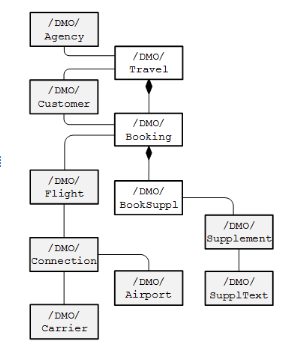
There are three main entities that we are going to have composition relationship. As we know it is a tightly coupled relationship and from the above diagram we can understand /DMO/Travel is root entity and /DMO/Booking is its child entity. This means no booking can exist without travel. Similarly /DMO/BookSuppl is child to /DMO/Booking which means no booking supplements can exist without its booking. The other entities are association which we will use to get other information.
Let us start by defining our data definitions on our root and child entities.
We will create our data definition on our root table /DMO/Travel and then associate it with other views.
Good thing is that SAP has already created CDS views over some tables. Like in our diagram for customer and agency tables SAP has created views /DMO/I_Agency and /DMO/I_Customer. Similarly for currency we have I_Currency and for Stauts we have /DMO/I_Overall_Status_VH.
If you open any of these views you will see annotations which we have already used in our previous application.
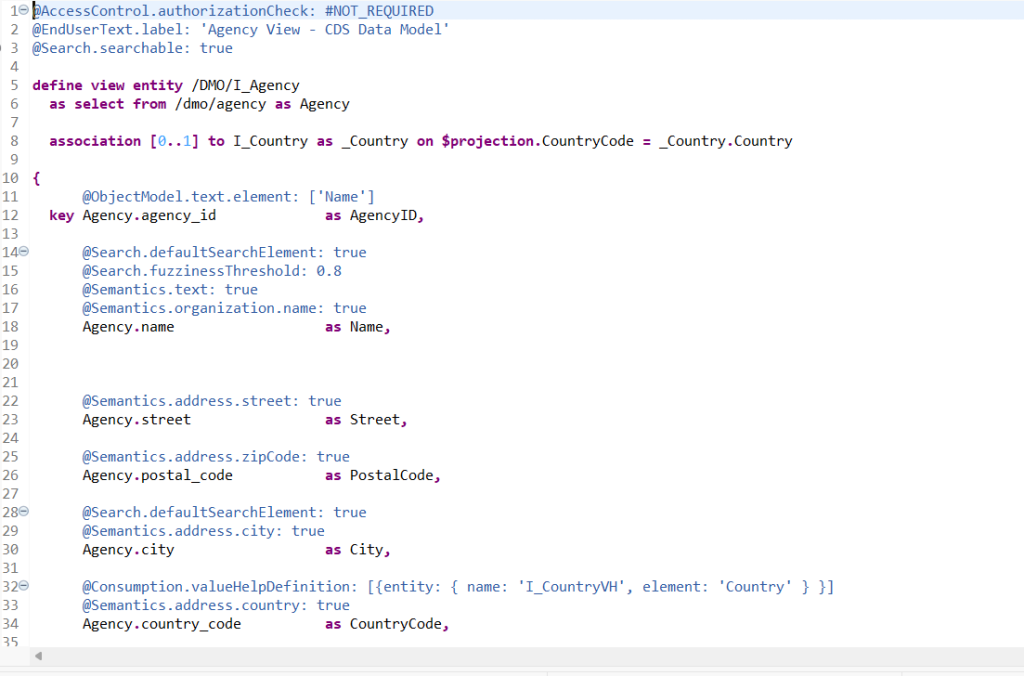
Now let us create association relationship with these views.
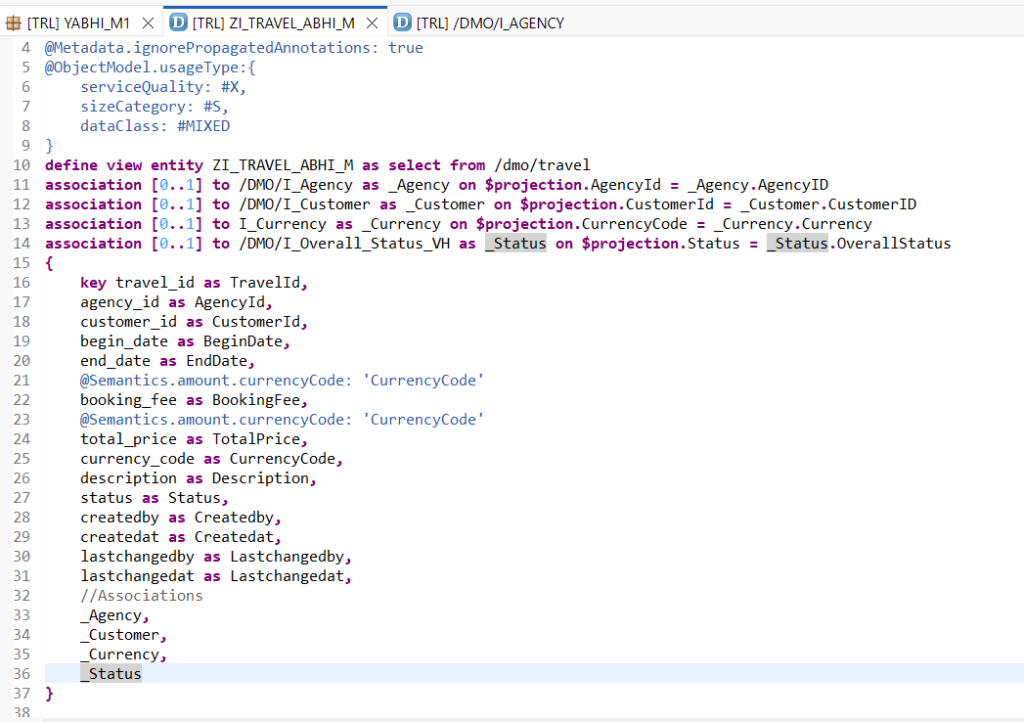
With this we have prepared our root entity and associated it with other entities for information. In our next blog we will prepare our child entities and create composition relationship between parent and child entities for our SAP RAP managed scenario.
Also read – Mastering ABAP RAP : Business Service Provisioning & Consumption
Is it possible to create an elements app with managed scenario, odata v2, no draft and CRUD functionality?
All I get is an empty object page when I press Create.
Yes, it’s possible to build a Fiori elements app (V2) with a managed scenario, OData V2, no draft, and full CRUD—but an empty Object Page on Create usually means the app has no facets/field groups to render, or the annotations/capabilities don’t allow creation/editing.